Plan a graduate program recruitment video that converts: 60–180s runtime guidance, a production checklist, and distribution metrics for admissions teams.

Make Applicants Click: Graduate Program Recruitment Video (60–180s)
The highest-impact deliverable is a program overview video, 60 to 180 seconds, paired with a modular library of short clips covering faculty, students, labs, and application steps. Short, focused assets fit web pages, social platforms, and embeds. They push traffic straight to your application page. Build the library in that order and you’ll have usable content within weeks, not months.
TL;DR:
Short videos under three minutes effectively capture attention and convert viewers by highlighting faculty expertise, student life, and application details.
Creating segmented, purpose-driven clips for different social platforms and embedding a comprehensive overview on your program page maximizes reach and engagement.
Planning a production timeline of four to eight weeks with a small crew, explicit scripts, prompts, and signed releases ensures timely and high-quality content delivery.
Captions and mobile-optimized formats are essential, with shooting in multiple aspect ratios during the same take to accommodate social media and web embed needs.
Tracking view counts, click-through rates, and engaged viewing times helps assess video impact without relying on vanity metrics.
Simchon ProductionsTell Your Program’s Story ClearlySimchon Productions creates cinematic films for universities, using authentic storytelling and focused messaging to build connection and trust.Explore Simchon Productions
Table of Contents
Which video assets should a graduate program prioritize?
What runtimes and formats work best for each asset?
How do you plan production: timeline, budget shapes, and staffing?
Production checklist: script, shots, interview prompts, and accessibility
How should programs distribute and measure recruitment video performance?
How can programs collect authentic student-led content safely and at scale?
Perspective from a cinematic studio: what filmmakers prioritize
How Simchon Productions can help your graduate program
Authoritative examples and source links
Sources
FAQ
Which video assets should a graduate program prioritize?
Start with the program overview, then build outward with short, single-purpose clips.
Your overview video is the front door. It should answer one question: why should a prospective student pick this program over the ten others in their browser tabs? Close it with a specific call to action, usually a link to your application deadline or a request-info page. The University of Arkansas built its Video Viewbook platform around this exact idea: short videos that funnel viewers to detailed program and funding pages, rather than trying to cram every detail into one film.
Once the overview exists, build these supporting assets:
Faculty and expertise profiles that highlight active research and mentorship style, not just a title and department.
Student testimonials and day-in-the-life clips that show real class schedules, research routines, and campus life.
Lab and facility tours that answer “what will I actually be doing here?”
Admissions process explainers that walk through deadlines, portal steps, and funding questions before a student ever emails your office.
A modular library beats one long promotional film because prospective students enter your funnel at different points. Someone scrolling Instagram needs a 30 second hook. Someone three weeks from a deadline needs a five minute walkthrough of the funding page. Scripps Research runs its virtual open house this way, breaking one event into topic-specific recorded segments that stay useful long after the live session ends.
What runtimes and formats work best for each asset?
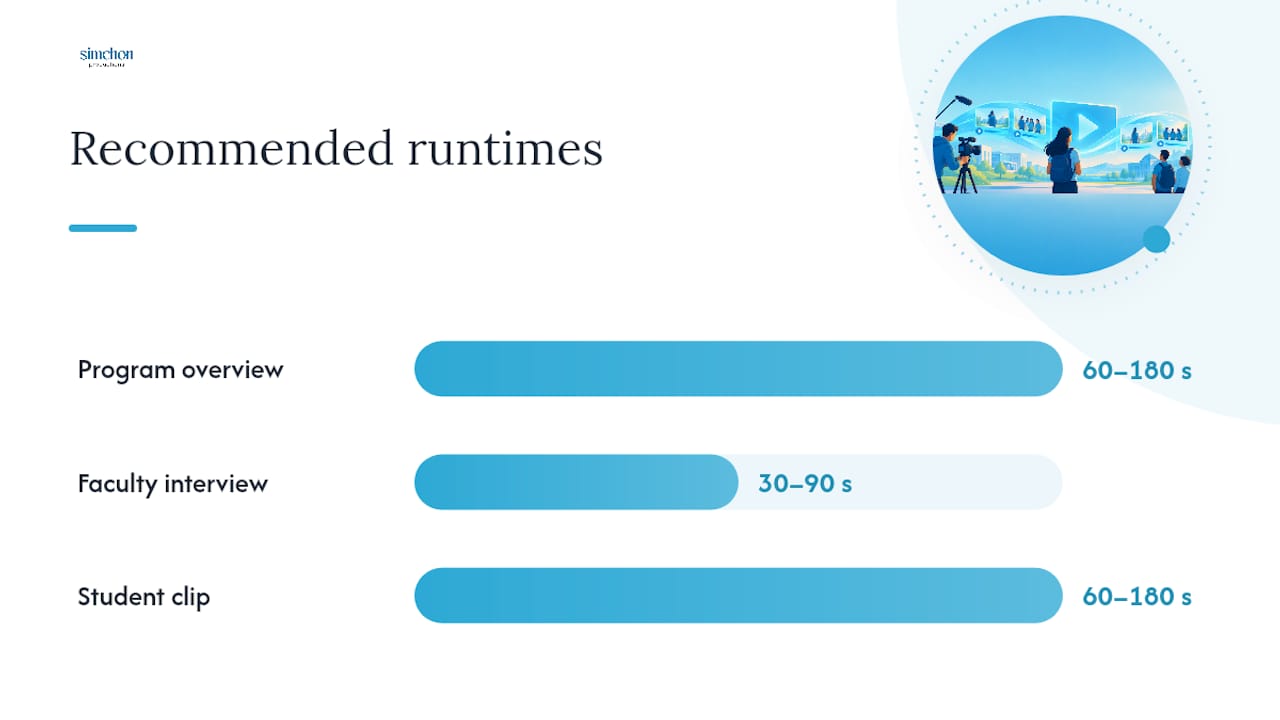
Program overviews run 60 to 180 seconds, faculty interviews run 30 to 90 seconds, and student clips stay under two minutes.
Those aren’t arbitrary numbers. Arkansas built its recruitment platform around the 60 to 180 second window for program overviews, betting that shorter videos hold attention long enough to drive a click without losing the viewer to a longer format. UNC’s BBSP program goes further on the student side, asking contributors to keep clips under two minutes to protect engagement and make editing faster.
Asset type | Target runtime | Format notes |
|---|---|---|
Program overview | 60 to 180 seconds | 16:9 for web embed, 9:16 cut for social |
Faculty interview | 30 to 90 seconds | Captioned, 16:9, usable standalone |
Student clip | 60 to 180 seconds | Vertical or square for social reels |
Virtual open house session | Segmented, topic-specific recorded segments | Recorded and archived for on-demand viewing |
Pro Tip: Shoot every interview in both 16:9 and 9:16 framing during the same take. You’ll cut your reshoot requests in half when the social team needs a vertical version six months later.
Every asset needs captions baked in, not optional. Mobile viewers watch on mute more often than not, and captioning is one of the easiest wins for reaching students across devices.
How do you plan production: timeline, budget shapes, and staffing?
Budget four to eight weeks total for a full asset library, from first planning call to final delivered files.

Preproduction runs one to four weeks. This is where you lock your messaging, confirm interview subjects, and get consent forms signed before anyone shows up with a camera. Shoot days run one to five days depending on how many departments and locations you’re covering. Post production runs one to three weeks per asset, though editing multiple short clips in parallel usually moves faster than one long film.
A lean production crew typically includes:
A producer who manages scheduling, releases, and department coordination.
A director or cinematographer who handles camera work and visual pacing.
An editor who cuts footage into the modular library.
A sound technician for interview audio, which matters more than most departments expect.
A captioning specialist or service to handle transcripts and accessibility files.
Budget scales with scope, not just runtime. A single overview video costs less than a full library covering five departments, but batching shoots into one multi-day production trip cuts your per-asset cost significantly, since you’re not paying separate travel and setup fees for every department. Using student-shot B-roll and remote video interviews for secondary content also trims cost without hurting quality where it counts most, on the hero overview film.
Put permits, signed releases, and captioning work on the schedule from day one, not as an afterthought. Missing a signed release from a featured student is the single most common reason a finished video sits unpublished for weeks.
Production checklist: script, shots, interview prompts, and accessibility
A usable shoot day starts with a one-line program message and a short list of interview prompts, written before anyone picks up a camera.
Nail down your one-sentence program proposition first: what makes this program different, stated plainly enough to say in the first 15 seconds of your overview. Back it with three supporting talking points, covering faculty strength, outcomes, and program culture.
For interview subjects, prepare specific prompts rather than open-ended questions:
“What surprised you most about this program in your first semester?”
“Describe a project or research moment that changed how you think about your field.”
“What would you tell someone considering this program who’s on the fence?”
For faculty: “What’s a research question in your lab that a new student could contribute to right away?”
Request enough B-roll to cover gaps: classroom shots, lab work, study spaces, and a handful of campus or city establishing shots. Ask for at least 10 to 15 setups per location so editors have real options in the cutting room.
Every deliverable needs captions, a full transcript, and file formats ready for direct web embed, not just a YouTube link.
How should programs distribute and measure recruitment video performance?
Publish videos directly on program pages as embeds, then push shorter cuts to YouTube, Vimeo, and social platforms for discovery.
Mobile optimization isn’t optional. Most prospective students first watch on a phone, so every clip needs a vertical or square cut ready for social feeds, plus captions for sound-off viewing. Arkansas built embed-friendly formatting directly into its Video Viewbook platform for exactly this reason.
Track a small set of metrics instead of drowning in vanity numbers:
View count by channel, to see where your audience actually finds you.
Average watch time, which tells you if your first ten seconds are working.
Click-through rate to your application or request-info page.
Assisted conversions, tracking whether video viewers who don’t click immediately still apply later.
Run small tests before committing to one final cut. Try two thumbnail options, a 90 second cut against a 180 second version, or moving your call to action earlier in the video. A video gallery widget makes it easier to manage and swap these modular assets on your program pages without a developer ticket every time.
How can programs collect authentic student-led content safely and at scale?
Recruit student volunteers with clear prompts, a simple tech spec, and a signed release before filming starts.
Send an open call to current students with specific prompts rather than “tell us about your experience.” UC Davis’s Slice of Life series works because it asks about specific moments, internships, mentorship relationships, and cohort friendships, not generic praise.
Set a submission deadline and a simple tech spec: horizontal or vertical phone video, decent lighting, clear audio.
Ask for both a raw clip and a short 30 to 60 second self-edited cut, giving your editor real options.
Edit lightly to preserve the student’s own voice and word choice.
Track every signed release form against the student’s name before publishing anything.
Pro Tip: Keep a shared spreadsheet of who’s signed a release and who hasn’t. It sounds basic, but it’s the single most common bottleneck when a video is ready to publish and one release is missing.
Perspective from a cinematic studio: what filmmakers prioritize
Cinematic framing, clean audio, and deliberate pacing change how much a viewer trusts what they’re watching, and trust is what turns a viewer into an applicant. A shaky, poorly lit interview reads as an afterthought, even when the content is strong. A cinematic studio prioritizes discovery and message testing before filming, because the wrong message shot beautifully is still the wrong message.
Client collaboration matters just as much as camera work. Structured review cycles, clear revision rounds, and a defined handoff of final files keep a project from dragging past its deadline. The programs that get the most out of their video library are the ones that treat the creative brief as seriously as the shoot day itself.
— Tzvi Simchon
How Simchon Productions can help your graduate program
Some video production companies build cinematic program overviews and modular video libraries for schools and institutions, including one strong overview film plus the faculty, student, and lab clips that support it.
A discovery call is where this starts. We talk through your program’s actual message, who you’re trying to reach, and what a realistic shoot and delivery timeline looks like for your department’s scope. From there, you get a clear production plan instead of a vague estimate. If your program has been putting off video because the last attempt felt flat or off-message, that often relates to planning rather than filming, and it can be addressed early in the process. Visit Simchon Productions to see recent work and request a quote for your program.
Authoritative examples and source links
The University of Arkansas Video Viewbook shows a full institutional example of modular short video recruitment. UNC BBSP’s guidance and FSU’s GradWorld instructions offer student submission templates. Scripps Research’s virtual open house and UC Davis’s Slice of Life series demonstrate segmented and testimonial formats worth studying directly.
Sources
FAQ
How long should a graduate program recruitment video be?
A program overview should run 60 to 180 seconds, based on the runtime target the University of Arkansas uses for its Video Viewbook platform. Student-contributed clips should stay under two minutes, per UNC BBSP’s guidance.
What should a graduate school marketing video include first?
Start with a one-sentence program proposition stated in the first 15 seconds, followed by faculty strength, student outcomes, and a clear call to action toward your application page. This structure mirrors what UC Davis’s Slice of Life series does with its career-focused student stories.
How much does a graduate program recruitment video cost?
Cost depends on scope, department count, and shoot days, so most production companies including Simchon Productions provide custom quotes rather than flat pricing. Current project details and quote requests are available directly on the Simchon Productions site.
How do you get students to participate in a recruitment video?
Send an open call with specific prompts, a simple phone-recording spec, and a signed release form before filming, following the model UNC BBSP and FSU’s GradWorld both use for student submissions. Offering students a short list of talking points, rather than an open-ended request, produces far more usable footage.
Where should graduate programs publish their recruitment videos?
Embed the program overview directly on your admissions page, then publish shorter cuts to YouTube, Vimeo, and social platforms for discovery. Mobile-ready, captioned formatting is essential since most prospective students first encounter video content on a phone.