Discover a comprehensive healthcare agency video marketing workflow. Learn the six key phases to boost efficiency and ensure compliance.

Healthcare Video Marketing Workflow for Agencies: 2026 Playbook
A compliant, repeatable healthcare agency video marketing workflow runs in six phases: plan, approve, produce, optimize, distribute, and measure. Before you touch a camera, complete three actions: confirm a signed Business Associate Agreement (BAA) with every production vendor, collect written patient consent for any subject appearing on screen, and assign a named clinical reviewer with a fixed sign-off deadline.
Pre-kickoff quick check:
Goals and KPIs defined (appointments booked, page conversions, training completion rate)
HIPAA risk flagged and BAA in place
Stakeholder owners assigned (marketing lead, clinical reviewer, legal/compliance contact)
Core workflow phases:
Plan: discovery, creative brief, audience mapping, KPI alignment
Approve: script clinical review, legal sign-off, consent collection
Produce: shoot, B-roll capture, on-set compliance controls
Optimize: captions, transcripts, metadata, schema markup
Distribute: owned site embedding, social publishing, email, portal delivery
Measure: watch time, completion rate, conversion tracking, reporting cadence
Table of Contents
Why does video marketing work for healthcare organizations?
Which video types should healthcare agencies produce?
What does the end-to-end production workflow look like?
How do you keep healthcare video production compliant and credible?
What SEO and accessibility steps belong in every video workflow?
How do you scale video operations across a healthcare agency?
What KPIs should you track for healthcare video campaigns?
What do healthcare video timelines and costs actually look like?
What templates and checklists does every healthcare video agency need?
How does Simchon Productions run a healthcare video project?
Key Takeaways
What I’ve learned running agency-driven healthcare video programs
Simchon Productions brings compliance-aware storytelling to healthcare video
Useful sources and further reading
Why does video marketing work for healthcare organizations?
Healthcare video marketing is not a nice-to-have anymore. It is one of the most direct ways to move a prospective patient from awareness to a scheduled appointment, and it works across the full funnel. Patient-facing content builds trust before the first visit. Procedure explainers reduce pre-appointment anxiety and cut inbound call volume. Staff training videos standardize onboarding across multiple locations without adding clinical SME hours.
The conversion case is concrete. Human faces in video are reported to increase conversion rates, and adding the word “video” to an email subject line measurably lifts open rates. For a healthcare organization running appointment-based services, even a modest lift in click-to-book rates from a service page video pays back production costs quickly.
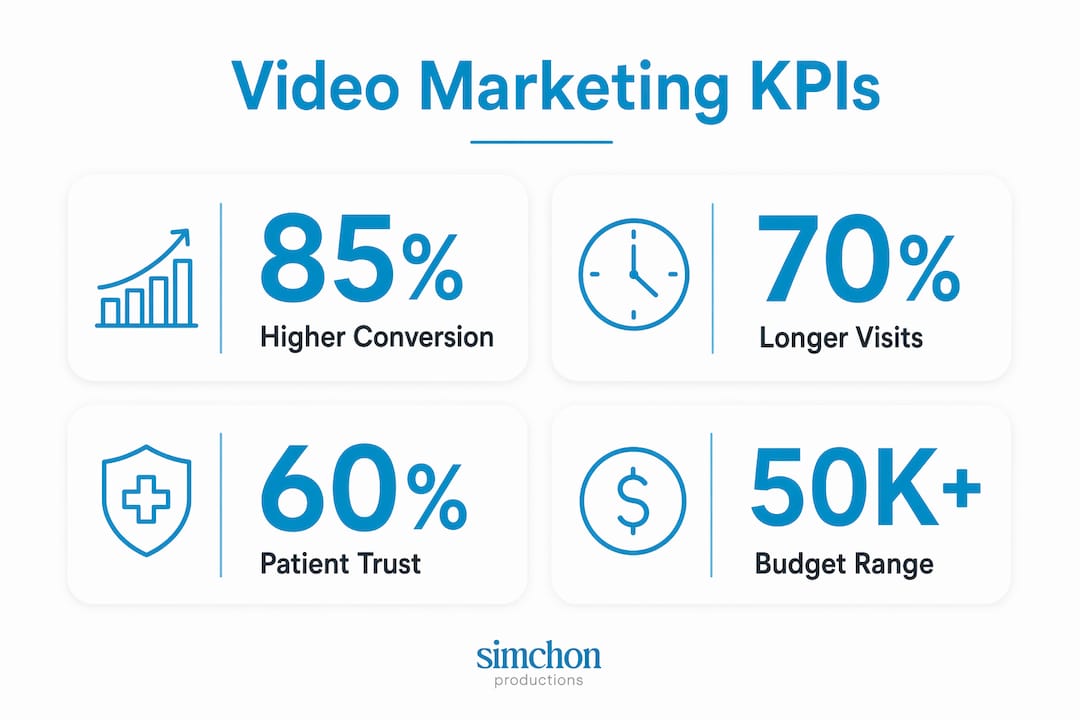
From an SEO standpoint, video embedded on owned pages keeps visitors on-site longer, signals content quality to search engines, and creates additional indexable assets when paired with transcripts and schema markup. The KPIs that connect most directly to budget justification are: new patient appointments attributed to video-assisted pages, organic traffic growth on pages with embedded video, and training completion rates for internal modules. Expect meaningful movement on those metrics within 60–90 days of a well-distributed launch, not overnight.
Budget expectations matter here. Healthcare video projects can range from $5,000 to $50,000+ per project, with a recommended 10–15% contingency set aside for clinical review rounds and unexpected reshoots. That range is wide because complexity drives cost, and healthcare adds layers of complexity that standard corporate video does not.
Which video types should healthcare agencies produce?
Strategy determines effectiveness more than production polish. The most common mistake is producing a patient testimonial with the same tone and framing as a clinician training module. They serve different audiences with different needs, and mixing those intents dilutes both.

Audience | Objective | Recommended Format | Ideal Length | Clinical Review Level | Distribution Channel |
|---|---|---|---|---|---|
Prospective patients | Trust and acquisition | Patient testimonial, facility tour | 60–90 sec | Light (no PHI, brand review) | Website, social, paid |
Current patients | Procedure education | Animated explainer, clinician intro | 90 sec | Full clinical sign-off | Patient portal, email |
Referring clinicians | Referral confidence | Physician profile, case overview | 2–3 min | Full clinical sign-off | LinkedIn, email, CME portals |
Internal staff | Onboarding/training | Training module, compliance refresher | 5–15 min | Compliance + HR review | LMS, intranet |
Community/donors | Awareness, fundraising | Mission story, impact video | 60–90 sec | Light (no PHI) | Social, email, events |
For new patient acquisition, a patient testimonial paired with a facility tour is the most effective combination. The testimonial provides emotional proof; the tour reduces the fear of the unknown. For procedure education, animation is often the better choice over live-action because it avoids any risk of incidental PHI exposure and can be updated without a reshoot. For staff onboarding, a modular training series beats a single long video every time because learners can complete sections at their own pace and managers can track completion by module.
For healthcare agencies also supporting school fundraising or nonprofit clients, the same audience-mapping logic applies. A school fundraising video needs a clear hook, a stated goal, and a specific call to action, whether that is buying a product or attending an event. The production workflow emphasizes storytelling and emotional resonance more than compliance. See Simchon Productions’ resources on healthcare brand film types for a deeper breakdown of format choices by campaign objective.
What does the end-to-end production workflow look like?
Pre-production matters more in healthcare than in standard corporate video. Scripts must include clinical flags, storyboards and shot lists are non-negotiable, and reshoots in clinical settings are often simply not feasible. Build the workflow around that constraint.
Step-by-step workflow
Discovery and kickoff — Marketing lead runs a kickoff meeting with clinical reviewer, legal/compliance contact, and producer. Deliverable: signed project brief with goals, audience, KPIs, and compliance scope.
Creative brief and audience mapping — Producer and marketing lead draft the creative brief. Deliverable: approved brief with format, tone, distribution plan, and budget.
Script and clinical flagging — Writer drafts script; clinical reviewer flags any claims requiring evidence or modification. Deliverable: clinically cleared script with tracked changes and sign-off log entry.
Storyboard and shot list — Producer creates storyboard and shot list. Deliverable: approved storyboard with location notes and equipment list.
Consent and scheduling — Marketing lead collects signed patient authorization forms and talent releases. Deliverable: signed consent forms filed in the project archive before shoot date.
Shoot — Producer and crew execute shoot per shot list and on-set compliance rules. Deliverable: raw footage transferred to secure, encrypted storage.
Post-production — Editor assembles cut, adds captions, and flags any incidental PHI for removal. Deliverable: rough cut submitted for review.
Compliance sign-off — Clinical reviewer and legal/compliance contact review final cut. Deliverable: signed approval log entry with date and reviewer name.
Optimization — Marketing lead adds metadata, transcript, and schema markup. Deliverable: optimized video file and metadata sheet.
Distribution and archiving — Video published to approved channels; final export, consent forms, and approval records archived together. Deliverable: live video with distribution report.
Approval log template
Stage | Reviewer | Role | Date Submitted | Date Approved | Notes |
|---|---|---|---|---|---|
Script | [Name] | Clinical Reviewer | |||
Script | [Name] | Legal/Compliance | |||
Final Cut | [Name] | Clinical Reviewer | |||
Final Cut | [Name] | Legal/Compliance | |||
Distribution | [Name] | Marketing Lead |
Gating items that must clear before moving forward:
BAA signed with all production vendors before shoot scheduling
Written patient consent collected and filed before shoot day
Clinical sign-off on script before storyboard begins
Clinical and legal sign-off on final cut before any distribution
Healthcare video projects typically require 8–12 weeks from kickoff to final delivery to allow for mandatory compliance reviews and clinical stakeholder sign-offs; rush jobs commonly incur a 25–50% premium.
How do you keep healthcare video production compliant and credible?
Consent workflows
Written patient authorization is required any time a real patient appears on screen, even in a non-clinical context. The consent form must specify: the exact uses of the footage (website, social, paid media), the duration of those rights, and the patient’s right to revoke consent and the process for doing so. Talent releases for paid actors or staff cover different ground and do not substitute for patient authorization when actual patients are involved.
CMOs should verify that production vendors carry $2M+ in insurance coverage when accessing clinical environments. That is not a bureaucratic formality. It is a real exposure point when a crew is operating near patients, equipment, or sensitive records.
HIPAA operational safeguards
Every crew member with access to a clinical environment must have documented HIPAA training on file before the shoot date. Footage must be transferred to encrypted storage immediately after capture. No raw footage sits on personal devices overnight. The BAA between the healthcare organization and the production vendor must be in place before any pre-production work begins — not just before the shoot.
Devices used on set should be inventoried and approved in advance. Cloud storage used for transfers must be covered under the BAA. If PHI is accidentally captured, that footage must be flagged, reviewed, and either edited out or destroyed before the file leaves the secure environment.
Storytelling guardrails
Patient-facing content needs to be human-centered and reassuring. Clinician-facing content needs clinical precision and evidence-backed claims. These are not interchangeable tones. A patient story video that leads with statistics reads cold. A physician profile that leans on emotional language loses credibility with the clinical audience. Script your content for one primary audience and hold that tone throughout.
On-set checklist for clinical environments:
Infection control protocols reviewed with facility manager before crew enters
Equipment placement approved to avoid blocking clinical pathways
Crew size minimized to reduce disruption
No patient-identifiable information visible in frame (whiteboards, charts, screens)
Clinical SME on call or on set to flag accuracy issues in real time
Pro Tip: Flag every clinical claim in the script with a highlight or comment before sending it to the reviewer. This cuts review time significantly because the reviewer can go directly to the flagged sections instead of reading the full script line by line.
What SEO and accessibility steps belong in every video workflow?
Video SEO and accessibility are not optional extras. They are mandatory workflow steps that determine whether your video gets found and whether it serves every patient who needs it. The Department of Health and Human Services requires healthcare organizations to provide accessible content for individuals with disabilities, and transcripts, rich metadata, and schema markup are the primary technical levers for both discoverability and compliance.
Metadata checklist for every video:
Title: descriptive, includes the primary patient search phrase (e.g., “What to Expect During a Knee Replacement — [Hospital Name]”)
Description: 150–300 words, includes secondary keywords, links to the relevant service page, and a clear call to action
Tags/categories: condition name, procedure name, location, specialty
Thumbnail: readable text overlay, no small print, high contrast for accessibility
Schema markup: VideoObject schema on the embedding page with name, description, thumbnailUrl, uploadDate, and duration fields populated
Metadata template example:
Title: What to Expect During a Colonoscopy | [Organization Name] Description: Dr. [Name], gastroenterologist at [Organization], walks you through every step of a colonoscopy — from prep to recovery. Learn what to eat beforehand, how long the procedure takes, and what your results mean. Schedule your appointment at [URL].
Captions and transcripts
Auto-generated captions are a starting point, not a finished product. Review and correct every auto-generated caption file before publishing. Use speaker labels when multiple voices appear. Place the full transcript on the same page as the embedded video, either as visible text or in an expandable section. Transcripts are indexed by search engines and function as a full-page SEO asset, not just an accessibility accommodation.
Hosting trade-offs
Embedding video on your organization’s own website maximizes SEO value and keeps traffic on your owned properties. Third-party platforms capture much of the SEO benefit for themselves. The practical answer for most healthcare organizations is a hybrid approach: host the primary copy on your own site or a HIPAA-compliant video platform, and publish a secondary copy to YouTube or LinkedIn for reach. Use canonical tags and structured data on the owned page to signal the primary source. Tools like Palmedor AI can automate transcript generation and metadata enrichment across both hosting environments, reducing the manual work of keeping metadata consistent.
How do you scale video operations across a healthcare agency?
Single-project workflows break down fast when you are managing multiple clients or a high-volume content calendar. The fix is a centralized, secure asset repository with consent and approval metadata attached to every file, and automation patterns that handle the repetitive steps without adding headcount.

Asset taxonomy example
Tag Category | Example Values |
|---|---|
Content type | Patient testimonial, explainer, training module, facility tour |
Approval status | Draft, Clinical review, Legal review, Approved, Archived |
Consent status | No patient / Consent on file / Consent expired |
Distribution rights | Website only / Social approved / Paid media approved |
Clinical reviewer | [Name] + date |
Expiration date | MM/DD/YYYY |
Every asset in the library should carry its consent status and approval status as metadata fields, not as a separate spreadsheet. When a consent form expires or a clinical claim becomes outdated, the asset is flagged automatically for review rather than quietly continuing to circulate.
Automation patterns
Templated edit sequences: Build master Premiere Pro or DaVinci Resolve sequences for each video format (60-second testimonial, 2-minute explainer, training module). Editors drop new footage into the template rather than rebuilding from scratch. This cuts editing time and keeps brand consistency without a style guide review on every project.
Automated captioning with human QA: Use an automated captioning tool to generate the first-pass SRT file, then route it to a human reviewer for accuracy correction before publishing. This is faster than manual transcription and more accurate than auto-captions alone.
Scheduled publishing pipelines: Connect your CMS and social publishing tools so that approved videos publish on a set schedule without manual uploads. Approval metadata in the asset library triggers the publishing queue only when all sign-offs are logged.
Governance checklist:
Access to raw footage restricted to approved crew and editors
Retention policy documented (minimum 6 years for HIPAA-covered records)
Audit trail enabled in the asset platform (who accessed, downloaded, or modified each file)
BAA covers the asset platform vendor
Archiving final exports, signed consent forms, and clinical approvals together in the same project folder is the simplest governance practice and the one most often skipped. Do not separate them.
What KPIs should you track for healthcare video campaigns?
Vanity metrics are easy to collect and nearly useless for budget justification. The right KPIs connect directly to the business objective the video was built to serve.
Objective | Primary KPIs | Secondary KPIs | Reporting Cadence |
|---|---|---|---|
Patient awareness | Unique views, reach, brand search lift | Social shares, video completion rate | Monthly |
Procedure education | Completion rate, time-on-page, call volume reduction | Repeat views, portal engagement | Monthly |
New patient conversion | Click-to-book rate, assisted conversions, form fills | Bounce rate on video pages | Bi-weekly |
Staff training | Completion rate by module, quiz pass rate | Time-to-complete, re-watch rate | Per cohort |
Fundraising/awareness | Donation conversion rate, email click-through | Video shares, landing page dwell time | Per campaign |
Executive stakeholders need a one-page summary: total views, completion rate, and conversion outcomes tied to a dollar figure or appointment count. Production teams need a dashboard view: watch time by segment, drop-off points, and caption accuracy flags. Build both reports from the same data source so the numbers never diverge.
For videos embedded on owned pages, attribution requires a deliberate setup. Tag the video player with a Google Tag Manager event that fires on 25%, 50%, 75%, and 100% completion. Connect those events to your analytics goals. Then compare conversion rates on pages with embedded video against equivalent pages without it. That comparison is your clearest evidence of video’s contribution to conversions, and it is the number that wins budget renewals.
What do healthcare video timelines and costs actually look like?
The honest answer is that timelines and costs in healthcare video are driven more by compliance complexity than by production complexity. A 90-second patient testimonial with one review round takes far less time than a 90-second animated explainer that requires clinical sign-off on every claim.
Representative timelines:
Standard project (8–12 weeks): Discovery and brief (week 1–2), script and clinical review (week 2–4), storyboard and scheduling (week 4–5), shoot (week 5–6), post-production (week 6–9), compliance sign-off (week 9–10), optimization and distribution (week 10–12)
Expedited project (4–6 weeks): Compresses review windows and runs post-production in parallel with the second review round. Carries a 25–50% cost premium and increases the risk of revision cycles after delivery.
Primary cost drivers:
Patient consent logistics: scheduling, coordination, and legal review of consent forms add time and cost that standard corporate shoots do not carry
Multi-location shoots: each additional location adds travel, scheduling, and on-set compliance setup costs
Animation and 3D: custom medical animation typically costs more per minute than live-action and requires clinical review of every visual element
Clinical SME time: if a physician or specialist must be on set or available for real-time review, that time has a cost
Rush premiums: compressing the timeline by more than 30% typically triggers a 25–50% surcharge
Insurance and BAA requirements: vendors who carry $2M+ insurance and maintain documented HIPAA training charge accordingly, and that cost is appropriate
Contingency planning: Build a 10–15% contingency into every healthcare video budget. Spend it first on additional clinical review rounds if the script is complex, and second on reshoot coverage if the clinical environment creates unexpected constraints. Do not spend contingency on production upgrades until compliance costs are fully covered.
What templates and checklists does every healthcare video agency need?
Standardized templates are what convert a one-time project into a repeatable program. Every handoff between production, legal, and marketing should be governed by a documented template, not a verbal agreement.
Template | Purpose | Key Fields | Storage Location |
|---|---|---|---|
Creative brief | Aligns all stakeholders before production begins | Goals, audience, format, KPIs, distribution plan, budget, compliance scope | Asset library, version-controlled |
Script with clinical flags | Ensures clinical review is targeted and efficient | Scene number, dialogue, clinical flag (Y/N), reviewer comment, sign-off date | Asset library, linked to approval log |
Patient consent / authorization form | Documents patient’s informed agreement to appear on camera | Patient name, uses of footage, duration of rights, revocation process, signature | Project archive, filed with final export |
Talent release | Covers paid talent and staff appearances | Talent name, compensation, usage rights, duration | Project archive |
Call sheet | Coordinates shoot day logistics | Crew list, location, schedule, emergency contacts, on-set compliance notes | Shared with crew 48 hours before shoot |
Shot list | Ensures pre-production planning prevents reshoots | Scene, shot type, subject, notes, clinical flag | Attached to storyboard in asset library |
Approval log | Creates an auditable record of every sign-off | Stage, reviewer name, role, date submitted, date approved, notes | Asset library, linked to final export |
Version control is not optional. Every template should carry a version number and a last-updated date. When a consent form is revised to reflect a regulatory change, the old version must be archived, not deleted, and all projects using the old version should be flagged for review. Store templates in the same centralized asset library as finished videos so the connection between the template and the output is always traceable.
Handoff checklist between production, legal, and marketing:
Script delivered to clinical reviewer with all flags highlighted
Consent forms collected and filed before footage is transferred
Final cut delivered to legal with approval log attached
Approved video delivered to marketing with metadata sheet and transcript
Final export, consent forms, and approval records archived together in the project folder
How does Simchon Productions run a healthcare video project?
A regional health system in the tri-state area came to Simchon Productions needing a patient story video for a new cardiology service line. The goal was straightforward: build trust with prospective patients who were anxious about cardiac procedures and drive appointment requests from the service page.
Discovery (week 1): Kickoff meeting with the health system’s marketing director, clinical reviewer (the department’s cardiology chief), and legal contact. Deliverables: signed creative brief, confirmed BAA, and a list of three potential patient subjects for consent outreach.
Script and consent (weeks 2–4): Script drafted with all clinical claims flagged. Clinical reviewer returned notes within five business days. Consent outreach to two patient subjects; one signed authorization returned within the week. The second required an additional conversation with the patient’s family, which added four days to the schedule.
Shoot (week 5): One-day shoot at the facility. Crew of four, all with documented HIPAA training. Shot list executed in full. No incidental PHI captured. Raw footage transferred to encrypted cloud storage same day.
Post-production and sign-off (weeks 6–9): Rough cut delivered at week 6. Clinical reviewer requested one change to a claim about recovery time. Revision turned around in 48 hours. Legal sign-off completed at week 8. Final cut delivered at week 9.
Optimization and distribution (weeks 10–11): Transcript written, captions reviewed and corrected, VideoObject schema added to the embedding page. Video published to the service page and a secondary copy uploaded to the health system’s YouTube channel.
The lesson from this project was that consent logistics, not production, drove the schedule. In subsequent projects, Simchon Productions moved consent outreach to week 1, running it in parallel with the creative brief rather than after it. That change alone reduced average project timelines by 10–12 days.
The workflow change also included a dedicated clinical review calendar built into the project plan from day one, with a named backup reviewer assigned in case the primary reviewer was unavailable. Approval bottlenecks dropped significantly across the following three projects.
Key Takeaways
A compliant, repeatable healthcare video program requires a BAA before any production work begins, written patient consent before any shoot, and a named clinical reviewer with a fixed deadline at every script and final-cut stage.
Point | Details |
|---|---|
Compliance gates first | BAA, patient consent, and clinical sign-off must clear before each phase advances — no exceptions. |
Budget for complexity | Healthcare video projects range from $5,000 to $50,000+ per project; build in a 10–15% contingency for clinical review rounds and unexpected reshoots. |
Timeline is compliance-driven | Standard projects run 8–12 weeks; rush timelines carry a 25–50% premium and compress the review windows where errors occur. |
SEO and accessibility are workflow steps | Transcripts, metadata, and schema markup belong in the production checklist, not as an afterthought after publishing. |
Simchon Productions | Simchon Productions runs compliance-aware, storytelling-first healthcare video projects for organizations in the tri-state area. |
What I’ve learned running agency-driven healthcare video programs
The single biggest mistake I see healthcare marketing teams make is treating clinical review as a final step rather than a parallel track. By the time a script reaches the clinical reviewer in the last week before the shoot, there is no real time to act on substantive feedback. The reviewer either rubber-stamps it or blows up the timeline. Neither outcome is good.
The fix is simple but requires discipline: share a flagged script outline with the clinical reviewer at the brief stage, before a full script is written. Get their input on the claims you plan to make and the framing you intend to use. That 30-minute conversation at week two saves two weeks of revision at week eight.
The second pitfall is device-based storage of raw footage. I have seen productions where crew members transferred footage to personal laptops overnight because the secure transfer process was slow. That is a HIPAA exposure waiting to happen. The secure transfer workflow needs to be fast enough that it is not tempting to work around it. If it is not, fix the workflow before the shoot, not after.
My priority triage for any healthcare video program: compliance and clinical accuracy first, always. Storytelling and distribution optimization are important, but they are built on a foundation of trust. A video that goes viral for the wrong reason, a factual error or a consent violation, does more damage than no video at all. Get the compliance infrastructure right, then focus on making the content genuinely compelling.
Simchon Productions brings compliance-aware storytelling to healthcare video
Healthcare video production requires a partner who understands both the clinical environment and the creative process. Simchon Productions works with healthcare organizations and agencies in the tri-state area to produce patient stories, procedure explainers, clinician profiles, and training modules that are built on a documented compliance workflow from day one.
Every project starts with a signed BAA, a defined scope, and an agreed set of KPIs. Simchon Productions handles consent logistics, clinical review coordination, and post-production optimization so your team is not managing those details across multiple vendors. The result is a finished video with a complete compliance archive: consent forms, approval logs, and final exports stored together and ready for audit.
See the work at Simchon Productions’ portfolio, or reach out directly to start a discovery conversation about your next healthcare video project.
Useful sources and further reading
The following references back the compliance, production, and distribution guidance in this guide. Each is most useful at the workflow stage noted.
Healthcare Video Production: A CMO’s Evaluation Guide — Most useful for vendor vetting, BAA requirements, insurance thresholds, timeline expectations, and budget ranges. Reference this at the kickoff and vendor selection stages.
Healthcare Video Production: The Complete Playbook for 2026 — Detailed pre-production guidance including script flagging, shot lists, and asset archiving. Reference this during script development and post-production.
How to Create a Video Marketing Strategy for Healthcare Organizations in 2026 — Distribution strategy, SEO hosting trade-offs, and metadata best practices. Reference this during the optimization and distribution phases.
Healthcare Video Marketing: The Ultimate Guide (B2W) — Format selection, audience mapping, and HIPAA compliance overview. Useful at the creative brief and format selection stages.
How to Use Video Effectively as a Healthcare Marketing Tool (Full Media) — ADA accessibility requirements, YouTube SEO best practices, and lessons from Mayo Clinic’s video strategy. Reference this during the SEO and accessibility optimization phase.
Healthcare Video Marketing Playbook (Cyrano Video) — Production quality, HIPAA compliance in practice, and long-term content strategy. Useful across the full workflow as a compliance and strategy reference.
5 Tips to Raise More With School Fundraising Videos (SchoolMoney.org) — Multichannel distribution and engagement tracking for fundraising video campaigns. Reference this for nonprofit and school fundraising video workflows.
A note on internal records: Keep all consent forms archived with the final video export and the approval log in the same project folder. These records should be retained for a minimum of six years to align with HIPAA record-keeping requirements. Internal case-study assets, including shoot schedules, clinical reviewer correspondence, and revision histories, should be stored in the same archive and treated as compliance documentation, not just production files.