Discover the essential role of post-production in nonprofit storytelling. Transform raw footage into powerful videos that inspire action!

Post-Production for Nonprofit Storytelling: A Practical Guide
Post-production is where raw footage becomes a persuasive, ethically sound story that moves donors to act. A well-edited nonprofit video shapes emotion, clarifies the ask, adds captions for accessibility, and delivers platform-ready files your team can deploy the same day masters are approved. The short version for your next leadership brief: post-production is not a finishing step — it is where the story is actually built.
Table of Contents
What does post-production include and why does each step matter for nonprofit videos?
Which post-production choices most strongly shape emotion and viewer action?
How do post-production choices affect measurable outcomes like sharing, retention, and donations?
What should nonprofits budget and expect for timelines and deliverables in post-production?
What technical and accessibility deliverables should a nonprofit require from post-production?
How does Simchon Productions use post-production to amplify nonprofit stories?
How can a team test different edits and reliably learn what works?
Key Takeaways
What the studio perspective tells you about managing post-production well
Simchon Productions’ nonprofit post-production services
Which sources back these recommendations and where can you learn more?
What does post-production include and why does each step matter for nonprofit videos?
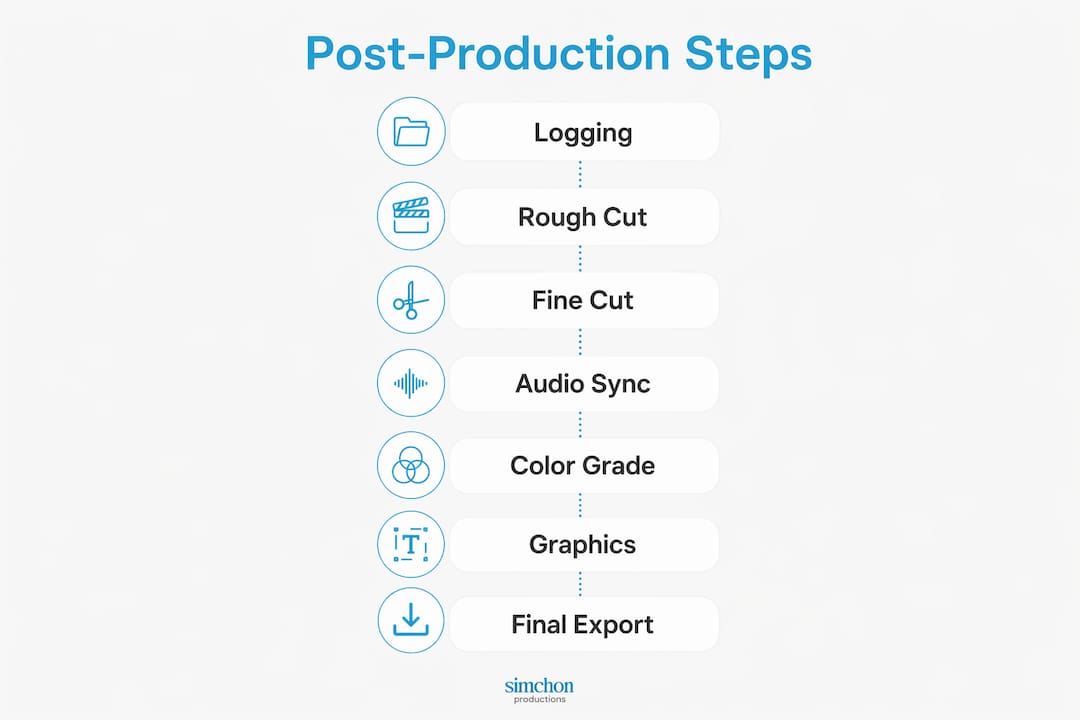
Post-production covers every step between the last day of shooting and the moment a finished file goes live. Each phase has a direct storytelling purpose, not just a technical one.
The eight core phases:
Assembly cut: Editor lays down all usable interview selects and b-roll in rough sequence. This is where narrative beats become visible and where you spot gaps in the story.
Editorial (fine cut): Pacing is tightened, interview selects are trimmed for clarity, and the emotional arc is locked. A recommended structure for short impact videos runs: 0–5s hook, 5–20s context, 20–60s personal story, 60–90s nonprofit solution, 90–120s proof of impact, 120–150s donation ask, then CTA.
Sound design and audio mix: Dialogue levels are balanced, room noise is reduced, and the voice of your subject sounds intimate and credible. Poor audio kills trust faster than shaky footage.
Music selection: The music bed sets emotional register. A hopeful, mid-tempo track under a recovery story reads differently than silence with ambient sound. Music choice is a storytelling decision, not a decoration.
Color grading: Consistent color across interview and b-roll footage signals professionalism. Warm tones tend to read as safe and human; cooler grades can feel institutional.
Motion graphics and titles: Lower thirds identify speakers, supers reinforce the ask, and animated logos close the piece. Graphics should support the story, not compete with it.
Captions: 85% of Facebook videos are watched on mute, making captions a distribution requirement, not an accessibility bonus.
Quality control (QC) and mastering: Final checks on audio levels, caption accuracy, logo placement, and privacy redactions before files are exported in all required formats.
Typical deliverables by platform:
Deliverable | Format | Specs |
|---|---|---|
Web/YouTube master | Web-optimized MP4 | 1920x1080 video, stereo audio |
Social square | Web-optimized MP4 | 1080x1080, captions burned in |
Vertical (Reels/TikTok) | Web-optimized MP4 | 1080x1920, captions burned in |
Broadcast/archive | ProRes 422 or DNxHD | 1920x1080 video |
Caption file | .SRT | Synced to web master |
Transcript | .DOCX or .PDF | Full verbatim text |
Pro Tip: Give your editor story-only notes on the rough cut. Hold audio, color, and graphics feedback for the fine cut. Mixing feedback types in round one doubles revision time and delays picture lock.
Plan for multi-format vertical edits at the shoot stage, not after the fact. Cropping a horizontal master for TikTok after delivery often cuts out the subject’s face or the on-screen text.
Which post-production choices most strongly shape emotion and viewer action?
Specific editorial decisions, not production budgets, determine whether a viewer shares your video or closes the tab.
High-impact editorial choices:
Hook length: Tightening the opening to under five seconds before the first emotional beat reduces early drop-off. A slow title card at the start loses viewers before the story begins.
Interview selection: Choosing a soundbite where the subject’s voice breaks slightly over a polished, composed answer creates more emotional resonance. Authenticity reads as credibility.
B-roll placement: Cutting to a close-up of hands or eyes at the moment of emotional disclosure amplifies the feeling without the subject saying anything extra.
Music bed swap: Replacing an uplifting orchestral track with sparse piano under a grief story can shift viewer response from inspiration to empathy, which changes whether they comment or share.
Proof-of-impact placement: Moving a “before and after” result shot to the 90-second mark rather than the end increases the chance a viewer sees it before dropping off.
Color decisions: Desaturated, cooler tones in archival or problem-context footage versus warmer, saturated tones in resolution footage creates a visual contrast that reinforces the narrative arc.
Research on nonprofit video engagement shows that content evoking high-arousal, high-dominance emotions like joy or triumph generates more shares, while content evoking sadness or fear tends to generate more comments. Editors who understand this can build two versions of the same story: one optimized for social reach, one optimized for donation consideration.
Editing vulnerable subjects requires an ethical frame. Never use a soundbite that reveals more than the subject intended to share. If a subject cries on camera, the editor’s job is to use that moment to honor their experience, not to exploit it for emotional effect. Dignity-first editing means the subject would watch the final cut and feel proud, not exposed.
Documentary-style nonprofit videos are reported as roughly 2.3 times more trustworthy than traditional advertising formats, which is why interview-driven editing consistently outperforms scripted spokesperson approaches for donor conversion.
How do post-production choices affect measurable outcomes like sharing, retention, and donations?

Editorial decisions connect directly to the KPIs your development team tracks. Viewers retain about 95% of a message from video versus roughly 10% from text alone, which means a well-edited video does more message work than any email copy you write.
Primary metrics and the post choices that move them:
Retention rate: Shortened hooks, tighter pacing, and early proof-of-impact shots keep viewers watching longer. Track the drop-off curve in YouTube Analytics or Vimeo stats to find where the edit loses people.
Share rate: High-arousal emotional edits (joy, triumph, surprise) drive shares. If sharing is the goal, build the edit around a moment of unexpected resolution.
Click-through rate (CTR): Placing the donation ask at 90–120 seconds rather than the final frame captures viewers who drop off before the end. A visible on-screen CTA button or lower third reinforces the verbal ask.
Donation conversion: Landing pages with video convert about 80% better, and 72% of donors say they are likely to give after watching nonprofit video content. The edit that gets a viewer to the donation page is doing conversion work even if the gift comes three days later.
Email open-to-click rate: Video in emails increases donations 15–30%. The thumbnail frame you choose in post is the first thing a donor sees in their inbox.
Measurement example: A modular editing strategy, where one long-form video is cut into short-form social clips, helped one nonprofit campaign raise $23,539 and account for 37% of a year-end fundraising goal. The lift came from repurposed clips, not a new shoot.
Attribution note: Donations driven by video may arrive days after the first view. Track assisted conversions in Google Analytics alongside last-click data. A donor who watched your video on Tuesday and gave on Friday via a direct link is a video conversion, even if the attribution model does not credit it that way.
KPI | Post choice that moves it | Where to measure |
|---|---|---|
Retention rate | Hook length, pacing, early impact shot | YouTube Analytics, Vimeo |
Share rate | Emotional arc, surprise element | Facebook Insights, native analytics |
CTR | Ask placement, on-screen CTA timing | Email platform, landing page analytics |
Donation conversion | Landing page video, thumbnail frame | CRM, Google Analytics assisted conversions |
Email click rate | Thumbnail selection, video length | Email platform open/click reports |
What should nonprofits budget and expect for timelines and deliverables in post-production?
Post-production for nonprofit videos typically takes several weeks from logging through final masters. Budget and timeline vary by project type.
Conservative budget ranges:
Short-form social edit (60–90 seconds): $800–$2,500 per finished piece, depending on complexity and number of deliverable formats.
Impact story or testimonial (2–4 minutes): $2,500–$6,000, including audio mix, color, captions, and one round of revisions.
Documentary-style nonprofit film (8–20 minutes): $8,000–$25,000 or more, depending on footage volume, music licensing, and motion graphics scope.
A coordinated video strategy can deliver significant returns when planned and distributed well. That ROI depends on post-production quality, not just production value.
Sample 4-week post-production timeline:
Week 1: Logging, transcription, and assembly cut delivered for story review.
Week 2: Fine cut incorporating story feedback; picture lock approved by client.
Week 3: Audio mix, music licensing, color grade, and motion graphics applied.
Week 4: Captions, QC, final masters, and all platform deliverables exported.
Common add-on costs to budget as line items:
Music licensing: $150–$500 per track (royalty-free libraries) or $500+ for sync licenses.
Motion graphics package: $500–$2,000 depending on complexity.
Captioning and transcript: $100–$300 per video if not included in the base quote.
Additional deliverable formats (vertical, square, broadcast): $200–$500 per format.
Extra revision rounds beyond the contracted number: $150–$300 per round.
Organizations that build distribution plans before production achieve higher ROI. Knowing which platforms you need before the edit starts means your editor can plan the cut for multiple formats instead of retrofitting a finished piece.
What technical and accessibility deliverables should a nonprofit require from post-production?

Every nonprofit video project should have a minimum deliverables list written into the contract before production starts. Accessibility and platform readiness are not optional extras.
Required deliverables checklist:
Web-optimized MP4 (H.264, 1920x1080)
Vertical edit (1080x1920) with burned-in captions for Reels and TikTok
Square edit (1080x1080) with burned-in captions for Facebook and Instagram feed
SRT caption file synced to the web master
Searchable verbatim transcript (.DOCX or .PDF)
Archival master (ProRes 422 or DNxHD, uncompressed audio)
Thumbnail frame exported as a high-resolution JPEG
QC checklist before approving final assets:
Audio peaks between -12 dB and -6 dB; no clipping
Captions accurate to 99% or better; no missing lines
Logo placement matches brand guidelines; no cropping at frame edges
Privacy redactions applied (faces, names, locations where consent was not given)
All lower thirds spell subject names correctly
Color consistent across interview and b-roll footage
No jump cuts or audio pops in the final master
Platform | Format | Resolution | Caption requirement |
|---|---|---|---|
YouTube/Web | Web-optimized MP4 | 1920x1080 | SRT file uploaded separately |
Instagram Reels/TikTok | Web-optimized MP4 | 1080x1920 | Burned in |
Facebook feed | Web-optimized MP4 | 1080x1080 | Burned in |
Broadcast | ProRes 422 | 1920x1080 | Separate caption file per broadcaster spec |
Email thumbnail | JPEG | — | N/A |
Pro Tip: Request a searchable transcript for every video, not just captioned versions. Transcripts improve SEO, help your team pull quotes for grant reports, and give donors who prefer reading a way to engage with the story.
Uploading a transcript also helps search engines index your video content, extending the reach of the story beyond the initial campaign window.
How does Simchon Productions use post-production to amplify nonprofit stories?
Simchon Productions builds every nonprofit edit around the interview first. The editorial process starts with logging all interview footage, tagging selects by theme, and separating “ask-ready” soundbites from context-only material. That separation speeds the assembly cut and keeps the donation ask from getting buried in background information.
Simchon Productions’ post-production workflow:
Stage | Action | Nonprofit storytelling purpose |
|---|---|---|
Logging and transcription | Full verbatim transcript of all interviews | Speeds selection; enables grant-ready quotes |
Assembly cut | Story-first rough cut, interview-driven | Reveals narrative gaps before fine editing |
Fine cut | Pacing, b-roll intercutting, music selection | Locks emotional arc and ask placement |
Audio mix and color | Dialogue clarity, consistent visual tone | Builds credibility and viewer trust |
Graphics and captions | Lower thirds, supers, SRT and burned captions | Accessibility and platform readiness |
QC and delivery | Multi-format export, privacy review | Distribution-ready on approval day |
A before/after editorial example: A nonprofit client came in with 45 minutes of interview footage and a rough assembly that opened with two minutes of organizational history. Simchon Productions restructured the edit to open with a 4-second close-up of the subject’s face, followed by a single line of dialogue that named the problem directly. The organizational context moved to the 30-second mark. The result was a tighter hook and a clearer emotional entry point for the viewer.
Mission story video best practices for nonprofits consistently show that the first five seconds determine whether a donor keeps watching. Simchon Productions treats those five seconds as the most important editorial decision in the project.
Pro Tip: When briefing any post-production team, send a one-page document that names your primary audience, the single action you want them to take, and the one emotion you want them to feel. That brief cuts revision cycles in half.
Documentary-style editing, which emphasizes organizing footage by theme, selecting soundbites for depth, and intercutting observational b-roll, is the approach Simchon Productions applies to every nonprofit project, regardless of length.
How can a team test different edits and reliably learn what works?
Testing two versions of a nonprofit video edit is straightforward when you change only one variable at a time.
Step-by-step testing process:
Write a hypothesis. Example: “Moving the donation ask from 2:00 to 1:30 will increase CTR by reducing drop-off before the ask.”
Build two edits. Change only one variable: hook length, ask placement, or music bed. Keep everything else identical.
Run on matched audiences. Use the same email list segment, the same ad audience, or the same social post timing for both versions. Split the audience 50/50.
Collect data for 14–30 days. Track retention curve, CTR, donation conversion, and assisted conversions over the full attribution window.
Analyze and apply. The winning variable becomes the default for the next project. Document the result so the team builds institutional knowledge over time.
Sample report fields to capture after each test:
Audience segment and platform
Video length for each version
Variable tested (single change only)
Retention rate at 30 seconds, 60 seconds, and end
CTR on the donation link or CTA button
Donation conversion rate (last-click and assisted)
Total donations attributed within the 30-day window
Common pitfalls:
Changing two variables at once makes results uninterpretable. If you shorten the hook and swap the music in the same test, you cannot know which change drove the result.
Running a test for fewer than 14 days misses delayed donations from viewers who needed time to decide.
Using different audience segments for each version introduces a variable you did not intend to test.
Test variable | Metric to watch | Minimum test duration |
|---|---|---|
Hook length (0–5s vs. 0–10s) | 30-second retention rate | 14 days |
Ask placement (1:30 vs. 2:00) | CTR on donation link | 14 days |
Music bed (hopeful vs. sparse) | Share rate, comment volume | 4 weeks |
Thumbnail frame | Email click-to-open rate | — |
For a practical overview of fast post-production workflows that support rapid A/B testing, including how to build short-form edits quickly without sacrificing story quality, that resource covers the mechanics in detail.
Key Takeaways
Post-production is where nonprofit footage becomes a story that donors trust, share, and respond to with gifts.
Point | Details |
|---|---|
Post-production builds the story | Raw footage becomes a persuasive, accessible story only after editing, audio mix, color, and captions are complete. |
Emotion drives measurable behavior | High-arousal edits increase shares; low-arousal edits increase comments and donation consideration. |
Budget for the full scope | Include music licensing, captions, motion graphics, and multi-format exports as line items, not afterthoughts. |
Test one variable at a time | Change only hook length, ask placement, or music bed per test, and track results over 14–30 days. |
Simchon Productions | Simchon Productions uses an interview-first editorial process to build nonprofit videos that lock the emotional arc before any technical polish begins. |
What the studio perspective tells you about managing post-production well
Most revision cycles run long because teams give technical feedback on rough cuts. A rough cut is not ready for color notes or caption corrections. It is ready for one question: does the story work? Lock the answer to that question before anyone mentions audio levels.
Studio tips that reduce revision time:
Send a one-page brief before the edit starts: primary audience, single desired action, one target emotion.
Approve picture lock in writing before color, audio mix, or graphics begin. Changes after picture lock cost time and money.
Limit internal review to two or three named stakeholders. More reviewers mean conflicting notes and longer cycles.
Separate feedback rounds by phase: story on the rough cut, technical on the fine cut.
Red flags in vendor proposals and rough cuts:
No transcript or caption deliverable listed in the scope of work.
Vague timelines with no milestone dates (rough cut, fine cut, picture lock, delivery).
A rough cut that opens with a title card and organizational history instead of a human face or voice.
No mention of privacy review or consent documentation for vulnerable subjects.
Revision rounds listed as “unlimited” with no defined scope, which usually means no defined process.
How to structure internal review rounds:
Round one is for story only. Watch the rough cut without pausing. Ask: does the emotional arc land? Does the ask feel clear? Round two is for technical details on the fine cut. Round three, if needed, is for final approvals on captions, graphics, and legal clearances. Never mix rounds.
Simchon Productions’ nonprofit post-production services
Simchon Productions works with nonprofits across the tri-state area to build interview-driven films that move donors from awareness to action. The studio’s post-production process covers every phase from logging and transcription through multi-format delivery, with a specific focus on getting the emotional arc right before any technical polish begins.
For nonprofits that need a clear, credible story on a defined timeline, Simchon Productions delivers rough cuts within one week of logging, picture lock within two weeks, and final masters within four to six weeks depending on project scope. The studio also offers post-production-only engagements for organizations that have existing footage but need editorial expertise to shape it into a donor-ready film. Review the portfolio to see how editorial choices translate into measurable campaign results, then reach out to request a project quote.
Which sources back these recommendations and where can you learn more?
Nonprofit Video for Donor Engagement | Strategy Guide — covers donor intent statistics, ROI estimates, and recommended video structures for fundraising campaigns.
Nonprofit Video Storytelling Best Practices Guide 2026 — details multi-format planning, short-form repurposing, and campaign lift examples.
Video Production for Nonprofits: A Complete Guide | Kolstad Media Blog — practical timeline and distribution planning guidance for nonprofit video projects.
The Science of Nonprofit Video Engagement | Nonprofit Tech for Good — research-backed explanation of how emotion type affects sharing versus commenting behavior.
From Concept to Impact: The Ultimate Guide to Nonprofit Video Production | Nonprofit Point — covers post-production optimization, platform-specific formatting, and accessibility requirements.
How Documentary Film Production Can Amplify Your Nonprofit’s Mission | VGM — explains the documentary editorial approach and how it applies to nonprofit storytelling.